Go development basics
Program structure
First create a directory for Go development, for example:
go_project
- src
- go_code
- project01
- main
- hello.go
- package
- project02
- main
- package
hello.go contains a simple Go program:
package main
import "fmt"
func main(){
    fmt.Println("hello world!")
}
Notes: (1) Go source files use the .go extension. Each file belongs to one package; a package can contain multiple files. (2) package main declares the executable package. Library packages can have other names. (3) Every Go source file belongs to a package. (4) import “fmt” imports the standard formatting package, including functions such as fmt.Println. (5) func main() declares the executable entry point. func is the function keyword, and main is its name. (6) fmt.Println(“hello world!”) prints the message.
How Go programs run
Execution workflow
First write the Go program.
Then use go build to compile it into an executable.
go build hello.goFinally run that executable and inspect the result.
Alternatively, go run compiles and runs the source in one command without leaving the resulting executable in the working directory. It still performs compilation, so repeated runs include build overhead.
go run hello.goThe basic workflow is: write source → compile an executable → run it.
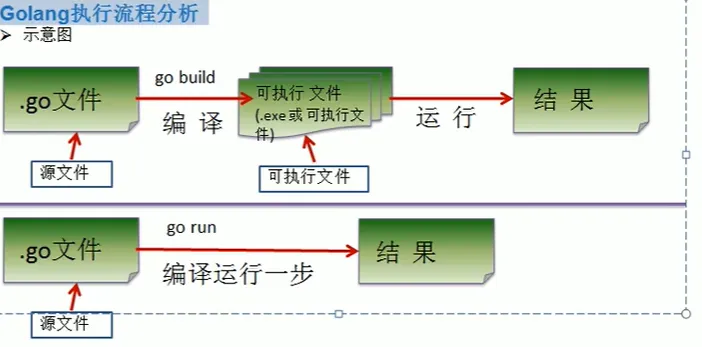
Running an already built executable avoids compilation overhead. go run is convenient for development and quick checks; deployment normally uses a built executable.
Differences between the workflows
(1) Go is compiled: source is translated into executable code before running.
(2) A built executable can be copied to another machine with a compatible operating system, architecture, and runtime dependencies.
(3) Running source with go run requires a Go toolchain on the other machine.
(4) Go typically links Go dependencies into the executable. This increases its size and simplifies deployment, although cgo can introduce external native dependencies.
Compiling and running Go
Compile
The compiler turns Go source into a binary.
Specify an output name with go build -o test.exe hello.go. Windows executable names conventionally use .exe; Linux executables need not have a suffix.
Valid source compiles successfully. Otherwise, compiler diagnostics identify errors and the build fails.
Run
-
Build an executable, then run it.
-
Use go run to compile and run in one command.
Syntax requirements and reminders
Go source uses the .go extension. Executable naming depends on the target system; Windows commonly uses .exe.
An executable Go program starts at main.
Go is case-sensitive.
Function bodies contain statements; explicit semicolons are usually unnecessary.
The language automatically inserts semicolons in specified positions. The usual style places one statement per line, though the language can permit multiple statements with explicit separators.
Unused imports and unused local variables cause compilation errors, helping keep the code clear.
Brackets must match; missing brackets cause syntax errors.
Escape characters
- \t: a tab
- \n: a newline
- \: a backslash
- ”: a double quote
- \r: a carriage return
Comments in Go
-
Line comments: //
-
Block comments: /* */
Code style
-
Prefer line comments for ordinary explanations of functions and statements.
-
Use consistent indentation and blank lines. Editors support Tab and Shift+Tab. gofmt -w main.go writes formatting back to the file; gofmt main.go prints the formatted source.
-
Let gofmt format spaces around operators.
-
Function braces
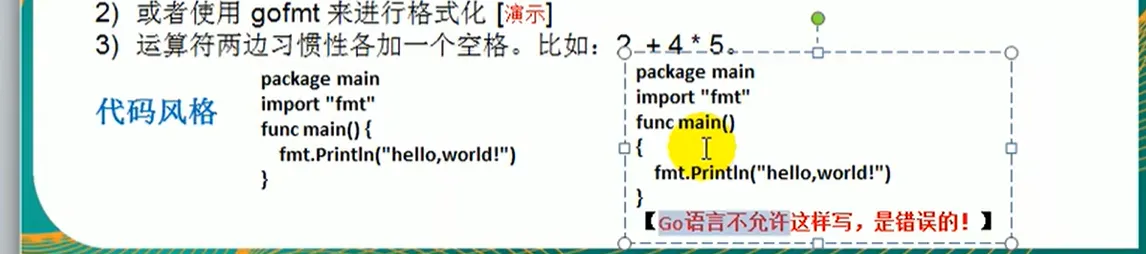
-
Use consistent spacing around keywords and operators.
-
Use mixed-case names for functions, variables, constants, and struct fields.
-
Keep lines readable; 80 characters is a useful project convention rather than a Go language limit.
Official Go learning resources
Official website: running and learning Go
Chinese programming guide: a Chinese guide, with other languages also available
Package documentation: package usage and explanations
The online tour lets you run examples. Its Run button executes the code.
Go standard APIs
What is an API?
An Application Programming Interface is the set of operations a component exposes, such as functions, types, and methods.
Go provides many standard-library packages.
Go Chinese community: Chinese package introductions and usage notes
In Go: package → source files → functions.
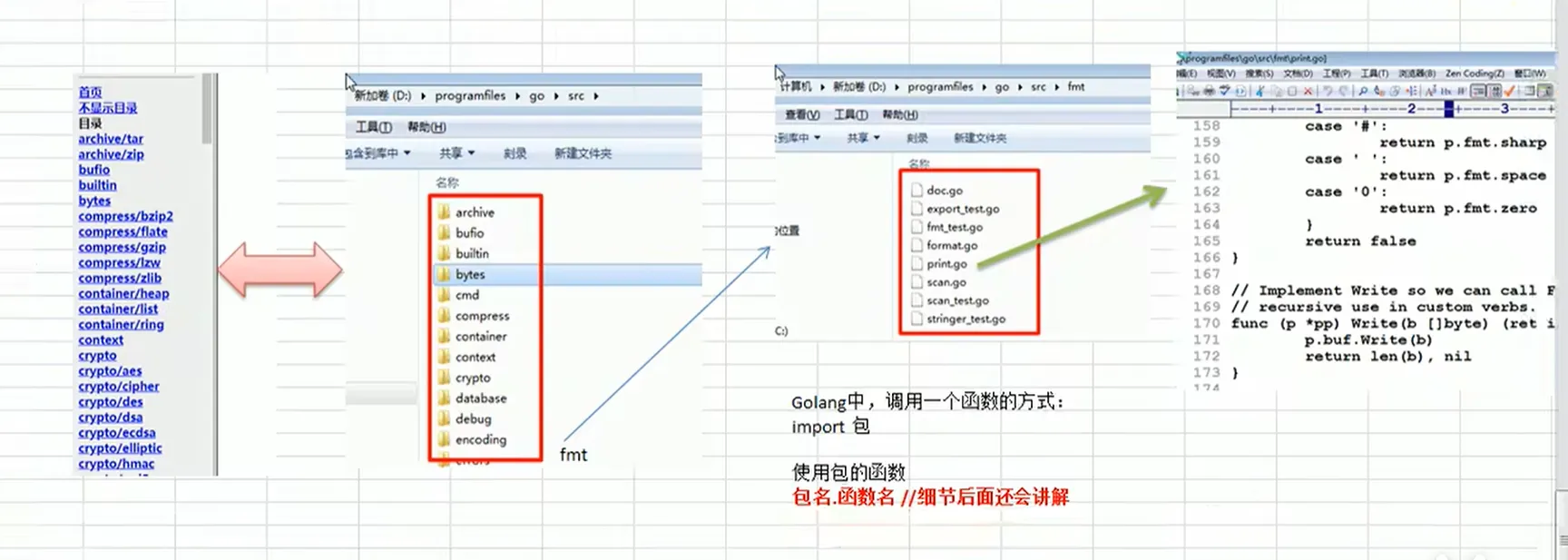
Import the package before using its exported functions.
Common errors and fixes
Comments should improve readability and explain the code.
-
File not found. Check the source filename and your working directory.
-
Syntax error. Check matching brackets and quotes, spelling, and other syntax rules. Use the compiler’s diagnostic to locate and correct the error.
Be careful to distinguish the digit “1” from the lowercase letter “l”.