Kratos: An elegant toolkit for Go microservices.
Kratos is a microservice-oriented governance framework implemented in Golang. It provides convenient features that help you quickly build a reliable application from scratch.
It is a Golang microservice framework open-sourced by Bilibili, and one of the mainstream microservice frameworks.
The name comes from the game God of War, which is set against Greek mythology and tells the adventure of Kratos, who rises from a mortal to the God of War and sets out to slaughter the gods.
Introduction
Installation and basic usage
Installation
Prerequisites
Installation commands
go install github.com/go-kratos/kratos/cmd/kratos/v2@latest
kratos upgrade
go install github.com/google/wire/cmd/wire@latest
After installation, check the available commands
(base) ➜  GoFramwork git:(main) kratos -h
Kratos: An elegant toolkit for Go microservices.

Usage:
  kratos [command]

Available Commands:
  changelog   生成 Kratos 变更 log
  completion  为指定的Shell生成自动补全脚本
  help        帮助指令
  new         生成一个服务模板
  proto       生成 proto 文件
  run         运行项目
  upgrade     升级 Kratos 工具

Flags:
  -h, --help      help for kratos
  -v, --version   version for kratos

Use "kratos [command] --help" for more information about a command.
Demo
Following the official instructions, create a Kratos HelloWorld.
First, use new to create the project
kratos new helloworldAfter new completes, we can see that different templates are available; here we select the first one, service.

Wait for generation to finish; this is the generated project structure
.
├── api  # API 定义层 (Protocol Buffers)
│   └── helloworld
│       └── v1
│           ├── error_reason.pb.go   # [生成] 错误原因的 Go 代码
│           ├── error_reason.proto   # 定义业务错误原因 (Enum)
│           ├── greeter_grpc.pb.go   # [生成] gRPC 服务端和客户端代码
│           ├── greeter_http.pb.go   # [生成] Kratos HTTP 服务代码 (路由、编解码)
│           ├── greeter.pb.go        # [生成] 请求/响应消息的 Go 结构体
│           └── greeter.proto        # 定义服务接口 (RPC) 和消息结构 (Message)
├── cmd  # 程序入口 (Entry Point)
│   └── helloworld
│       ├── main.go      # 主程序入口:负责初始化资源、依赖注入、启动服务、监听退出信号
│       ├── wire_gen.go  # [生成] Wire 依赖注入生成的具体代码 (不要手动修改)
│       └── wire.go      # Wire 依赖注入的声明文件,定义 ProviderSet
├── configs  # 配置文件
│   └── config.yaml      # 具体的配置内容 (如数据库地址、端口、日志级别等)
├── Dockerfile           # 容器化构建脚本
├── go.mod               # Go 模块依赖定义
├── go.sum               # Go 模块依赖校验和
├── internal  # 内部业务逻辑 (Go 规范:外部项目无法 import 此目录内容)
│   ├── biz   # [业务逻辑层 / 领域层] (Domain Layer)
│   │   ├── biz.go       # 定义 biz 层的 ProviderSet
│   │   ├── greeter.go   # 定义领域对象 (Entity) 和 业务接口 (Repo Interface),不依赖具体实现
│   │   └── README.md
│   ├── conf  # [配置定义层]
│   │   ├── conf.pb.go   # [生成] 配置文件的 Go 结构体
│   │   └── conf.proto   # 定义配置文件的结构 (将 YAML 映射为强类型 struct)
│   ├── data  # [数据访问层 / 基础设施层] (Infrastructure Layer)
│   │   ├── data.go      # 初始化数据库/Redis 连接,定义 data 层的 ProviderSet
│   │   ├── greeter.go   # 实现 biz 层定义的 Repo 接口 (数据库 CRUD、缓存、RPC 调用)
│   │   └── README.md
│   ├── server # [服务实例层]
│   │   ├── grpc.go      # 初始化 gRPC Server
│   │   ├── http.go      # 初始化 HTTP Server
│   │   └── server.go    # 定义 server 层的 ProviderSet
│   └── service # [应用服务层] (Application Layer)
│       ├── greeter.go   # 实现 api 定义的 protobuf 接口,负责 DTO -> DO 转换,编排 biz 逻辑
│       ├── README.md
│       └── service.go   # 定义 service 层的 ProviderSet
├── LICENSE              # 许可证文件
├── Makefile             # 项目管理脚本 (生成 API、编译、运行、测试等命令)
├── openapi.yaml         # [生成] OpenAPI/Swagger 接口文档
├── README.md            # 项目说明文档
└── third_party  # 第三方依赖的 Proto 文件 (用于生成代码)
    ├── errors           # Kratos 错误模型定义
    │   └── errors.proto
    ├── google           # Google 官方 Proto (API 注解、HTTP 映射、通用类型等)
    │   ├── api
    │   │   ├── ...
    │   └── protobuf
    │       ├── ...
    ├── openapi          # OpenAPI 生成相关的 Proto 定义
    │   └── v3
    │       ├── ...
    ├── README.md
    └── validate         # 参数校验规则 Proto 定义
        ├── README.md
        └── validate.proto
After that, we enter the directory and run the dependency download command
cd helloworld
go mod download
We can also write the proto source, wire, and so on ourselves, and have Kratos generate the corresponding code
go generate ./...Then run the project
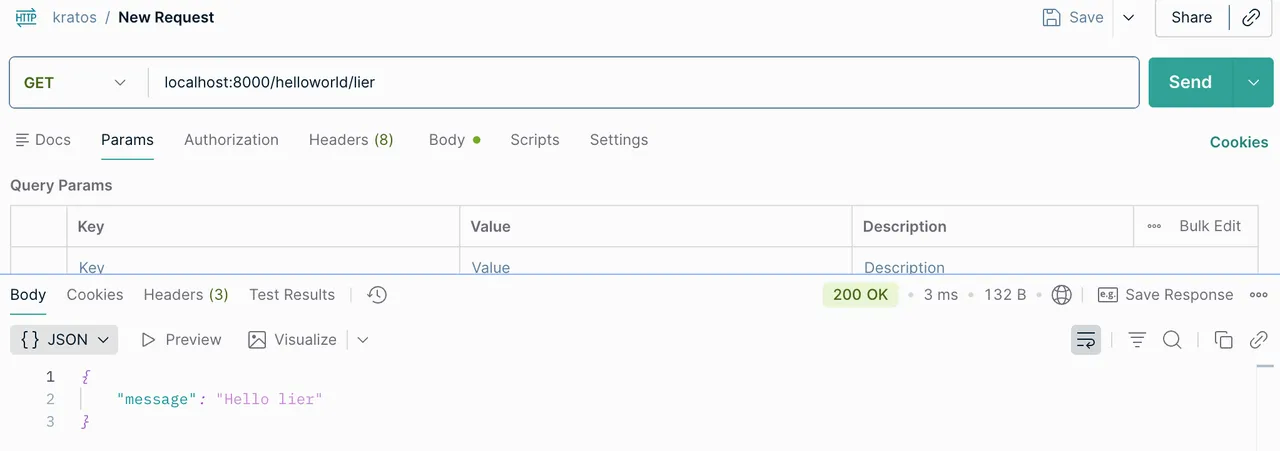
kratos run
Dependency injection with wire
See the article: Inversion of control and dependency injection
Kratos configuration
Configuration sources
-
Files: JSON, YAML
-
Environment variables: env
-
Configuration centers: Apollo, Consul
Reading configuration
-
c.Load and c.Scan; retrieve values with c.Value
-
c.Watch for configuration hot reload
-
Merging
-
Custom Resolver
-
Custom Codec
Configuration struct
Bootstrap in the internal/conf/conf.pb.go file
Core workflow for adding configuration to a program
-
1. Modify the internal/conf/conf.proto file and define the configuration with pb
-
2. Generate the Go code corresponding to the configuration. Run make config in the project directory. If you don’t have the make command installed, run:
protoc --proto_path=./internal \--proto_path=./third_party \--go_out=paths=source_relative:./internal \internal/conf/conf.proto -
3. Modify the configs configuration file
Notes
-
The pb file syntax must be correct
-
After modifying a pb file, always remember to generate the Go code
-
The configuration file must correspond to the structs in the Go code
-
The configuration file syntax must be correct
Custom HTTP responses
Create a response encoder and replace the default encoder; for a concrete demo, see httpencoder and http in the project.
package server

import (
        "net/http"

        kratoshttp "github.com/go-kratos/kratos/v2/transport/http"
        kratosstatus "github.com/go-kratos/kratos/v2/transport/http/status"
        "google.golang.org/grpc/status"
)

// 定义 HTTP 响应编码器

// 覆盖默认的  DefaultResponseEncoder, 通过  http.ResponseEncoder() 配置,注入到  http.Server() 中
type httpResponse struct {
        Code int32  `json:"code"`
        Msg  string `json:"msg"`
        Data any    `json:"data"`
}

func ResponseEncoder(w http.ResponseWriter, r *http.Request, v any) error {
        if v == nil {
                return nil
        }
        // 判断是否是重定向
        if rd, ok := v.(kratoshttp.Redirector); ok {
                url, code := rd.Redirect()
                http.Redirect(w, r, url, code)
                return nil
        }
        // 构造自定义的响应结构体
        resp := &httpResponse{
                Code: http.StatusOK,
                Msg:  "success",
                Data: v,
        }
        // 响应数据
        codec, _ := kratoshttp.CodecForRequest(r, "Accept")

        data, err := codec.Marshal(resp) // json.Marshal
        if err != nil {
                return err
        }
        // 设置响应头 Content-Type:application/json
        w.Header().Set("Content-Type", "application/"+codec.Name())
        _, err = w.Write(data)
        return err
}

// 自定义的错误响应编码器
func errorEncoder(w http.ResponseWriter, r *http.Request, err error) {
        if err == nil {
                return
        }
        resp := new(httpResponse) // 能从err里面解析出错误码的
        if gs, ok := status.FromError(err); ok {
                resp = &httpResponse{
                        Code: int32(kratosstatus.FromGRPCCode(gs.Code())),
                        Msg:  gs.Message(),
                        Data: nil,
                }
        } else {
                resp = &httpResponse{
                        Code: http.StatusInternalServerError, // 500
                        Msg:  "内部错误",
                }
        }

        codec, _ := kratoshttp.CodecForRequest(r, "Accept")
        body, err := codec.Marshal(resp)
        if err != nil {
                w.WriteHeader(http.StatusInternalServerError)
                return
        }
        w.Header().Set("Content-Type", "application/"+codec.Name())
        w.WriteHeader(int(resp.Code))
        _, _ = w.Write(body)
}
// 替换默认的 HTTP 响应编码器
opts = append(opts, http.ResponseEncoder(ResponseEncoder))
// 替换默认的错误响应编码器
opts = append(opts, http.ErrorEncoder(errorEncoder))Logging
To make it easier to use, Kratos defines two levels of abstraction: Logger unifies how logging is integrated, and the Helper interface unifies how the logging library is called.
Kratos’s logging library has the following main features:
-
Logger is used to connect to various logging libraries or logging platforms; you can use an existing one or implement your own
-
Helper is what you actually need to call in your project code, to write logs in business code
-
Filter is used to filter or modify the output logs (usually for log redaction)
-
Valuer is used to bind some global fixed or dynamic values (such as timestamps, traceIDs, or instance IDs) into the output logs
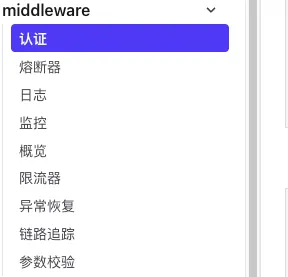
Middleware