
A reminder of Git commands I tend to forget, and the commit conventions I am learning to follow.
Commit conventions
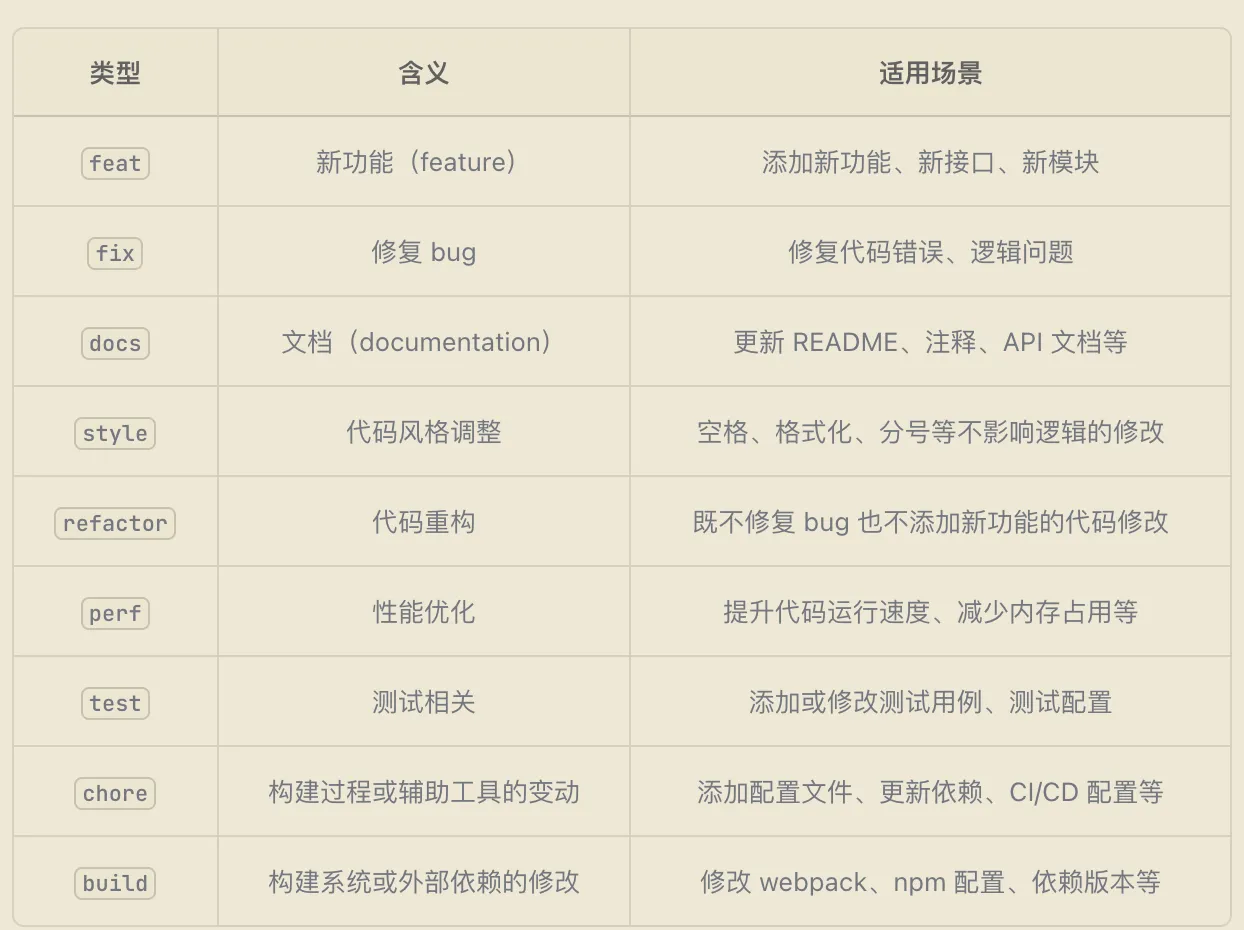
Commit message format
Use the following format for a commit:
<类型>(<范围>): <简短描述>

<更详细的描述>-
Type: the purpose or category of the change. Common types include:
-
feat: a new feature -
fix: a bug fix -
docs: documentation changes -
style: formatting or whitespace changes that do not affect behavior -
refactor: restructuring code without fixing a bug or adding a feature -
test: adding or changing tests -
ci: continuous integration changes -
build: changes to the build system or packaging tools -
revert: reverting a commit
-
-
Scope: the affected module or feature, enclosed in parentheses. Examples:
feat(api),fix(login)。 -
Short description: describe the purpose concisely, starting with a lowercase letter and keeping the subject within 50 characters.
-
Detailed description: explain the reason, solution, and key details. Leave a blank line after the subject. The body is optional but recommended; wrap lines at 72 characters.
Examples
-
feat(user-auth): add login API -
fix(api): fix invalid username validation -
docs(readme): update setup instructions -
refactor(auth): improve password hashing algorithm -
test(user): add unit tests for login functionality -
chore(deps): update dependency versions
Things to check before committing
-
Avoid:
-
Vague messages such as
fix,update,change. -
Oversized commits; split unrelated or large changes into smaller commits.
-
Changes to code behavior with no explanatory description.
-
-
Do:
-
Keep the message concise and meaningful so others understand the intent.
-
Make sure the code compiles and the tests pass before committing.
-
demo
git add . # 添加修改的文件到暂存区
git commit -m "feat(user-auth): add login API" # 提交代码并写简短描述
git push origin main # 推送到远程仓库
# 新特性
git commit -m "feat(auth): 添加用户api"
# 修复 bug
git commit -m "fix(validation): ..."
# 代码重构
git commit -m "refactor(user): ...."
# 添加测试
git commit -m "test(user): 为登录添加单元测试"
# 文档更新
git commit -m "docs(readme): 更新安装指南"
Common Git commands
Change the remote URL
git remote set-url origin <new-url>
Fetch a remote branch
# 同步远程仓库到main分支
git fetch origin main