Collections in Go: arrays, slices, maps, and lists
1. Arrays
Array declaration: var name [length]type
For example: var name [5]int
With no array length, []T denotes a slice, a distinct type that describes a portion of an underlying array.
1.1. Basic array usage
fmt.Println(name) prints the array’s elements.
An array has a fixed length.
Iterating over an array:
for _, value := range name{
    fmt.Prinntln(value)
}
1.2. Initializing arrays
//多种初始化方式
var name [5] int = [5]int{1, 2, 3, 4, 5}
var name = [5]int{1, 2, 3, 4, 5}
name := [5]int{1, 2, 3, 4, 5}

//只初始化部分元素
name := [3]int{2:3}
//前面的都为0,name[2] = 3

//数组的长度是不确定的
name := [...]int{1, 2, 3, 4, 5}
name := [...]int{1, 2, 3}
Arrays with the same element type and length have the same type and can be assigned. They can be compared when their element type is comparable.
1.3. Multidimensional arrays
//基本定义方式
var name [3][4] string
name[0] = [4]string{"a", "b", "c", "d"}
name[0][0] = "a"
2. Slices
A slice describes a segment of an underlying array. Its length can vary; copying a slice value can leave both slices sharing the same storage.
2.1. Basic slice usage
2.1.1. Declaring a slice
var name []string
fmt.Printf(%T, name)
//输出结果为[]string,本质是切片
2.1.2. Appending elements
// 使用append来增加元素,注意书写的格式
name = append(name, "a")
2.2. Initializing slices
Three common approaches are:
Slice an existing array
Use a []string{} literal
Use make
// 第一种
allName := [5]string{"aaa", "bbb", "ccc", "ddd", "eee"}
nameSlice := allName[0:2] // "左闭右开,包含0,不包含2"

//第二种
allName := []string{"aaa", "bbb", "ccc", "ddd", "eee"}
//在切片上也可以进行切片创建

//第三种
//第一个参数是切片的类型,第二个参数是预分配的空间(长度)
allName := make([]string, 5)
2.3. Accessing slice elements
allName := []string{"aaa", "bbb", "ccc", "ddd", "eee"}

sliceName := allName[start:end] //左闭右开
//如果没有end,默认是到最后一个元素
//没有start,有end,默认是从第一个元素开始到end之前的元素
//冒号一定存在
2.4. The ellipsis with slices
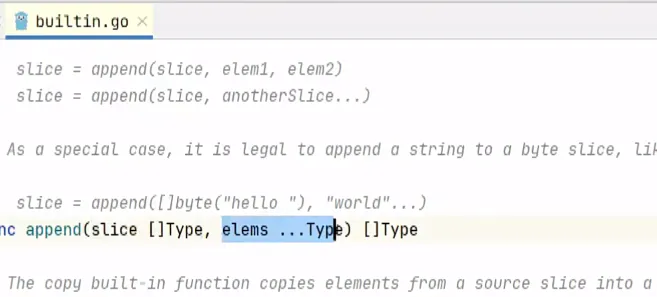
append can add several elements.
Pass the elements individually.
Or expand another slice with an ellipsis. An array must first be sliced if it is to be passed this way.
// 直接列出元素的情况
name := []string{"aaa", "bbb", "ccc", "ddd", "eee"}
name = append(name, "fff", "ggg", "hhh")

// 通过切片加入的情况
name := []string{"aaa", "bbb", "ccc", "ddd", "eee"}
name2 := []string{"fff", "ggg", "hhh"}
name = append(name, name2...)

// 通过数组加入的情况
name := []string{"aaa", "bbb", "ccc", "ddd", "eee"}
name2 := [3]string{"fff", "ggg", "hhh"}
name = append(name, name2[:]...)
2.5. Deleting and copying elements
2.5.1. Delete an element
Deletion commonly uses append to join the portions before and after the element, or builds a new slice.
// 切片的删除操作
name := []string{"aaa", "bbb", "ccc", "ddd", "eee"}
// 删除一个中间的元素
newName = append(name[:2], name[3:]...)

// 删除后面的元素
newName := name[:3]
newName = append(name[:3])
2.5.2. Copy elements
There are several ways to copy slice data.
name := []string{"aaa", "bbb", "ccc", "ddd", "eee"}

// 第一种切片赋值
name2 := name[:]

// 第二种使用copy函数
var name3 = make([]string, len(name))
copy(name3, name)
They differ in whether storage is shared.
Examples:
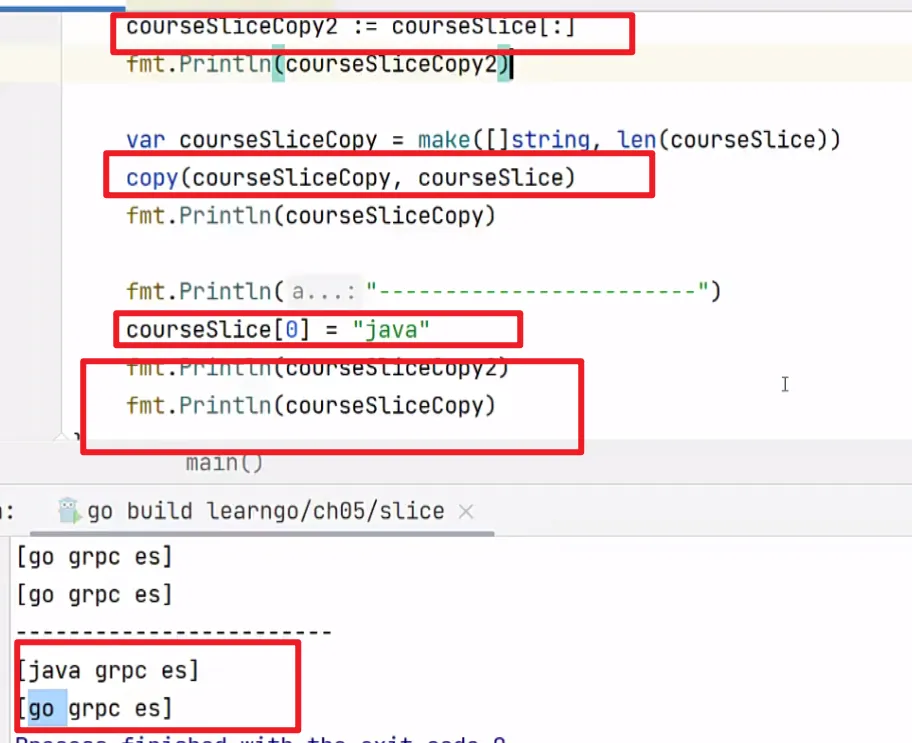
As shown here, a plain slice assignment shares the backing array, so modifying an element affects both. Copying into separately allocated storage with copy avoids that sharing.
Assignment copies the slice descriptor, including its pointer. copy copies elements into the destination storage; it does not allocate that storage itself.
2.6. How slices store data
Are slice function arguments passed by value or reference?
They are passed by value, but their shared backing array can create reference-like behavior.
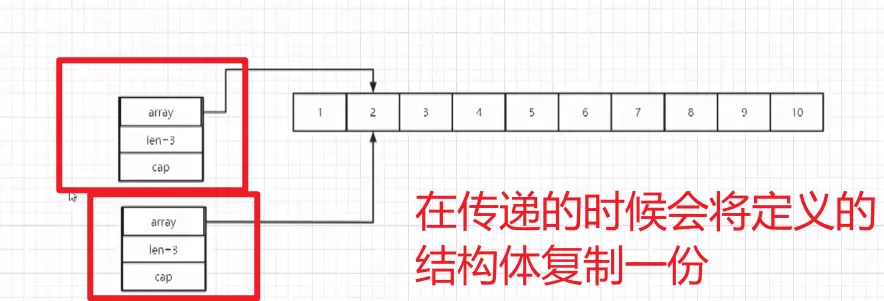
A slice descriptor contains a pointer to the backing array, a length, and a capacity.
2.6.1. The slice descriptor
// slice的底层结构如下:
type slice struct {
    array unsafe.Pointer   //用来存储实际数据的数组指针只想一块连续的内存
    len int                //切片中元素的数量
    cap int                //array数组的长度
}
2.6.2. Growing a slice
A slice has a capacity. Appending beyond it requires allocating a new array and copying existing elements.
The growth strategy depends on the runtime version, element size, and current capacity; do not rely on an exact doubling rule.
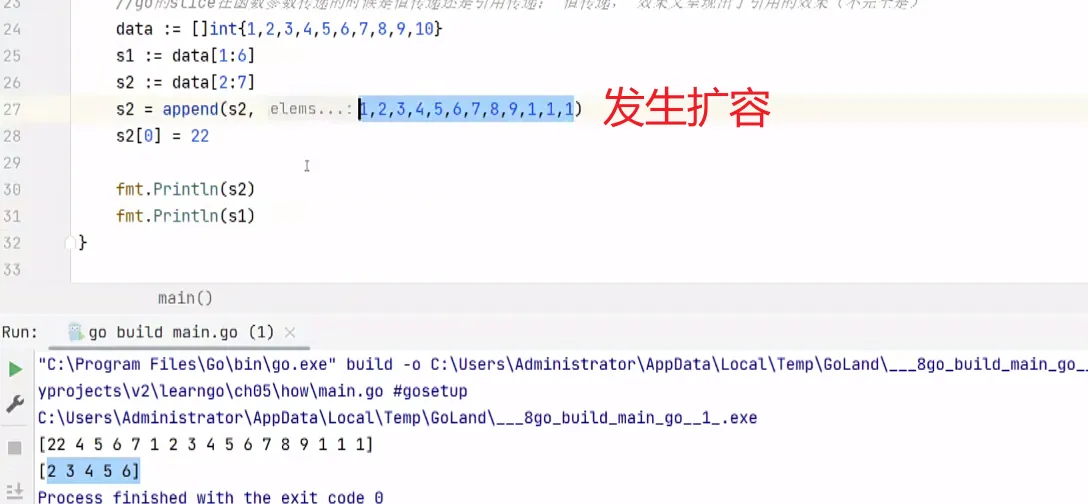
2.6.3. Passing a slice to a function
Passing a slice copies the descriptor. Its copied pointer initially refers to the same backing array.
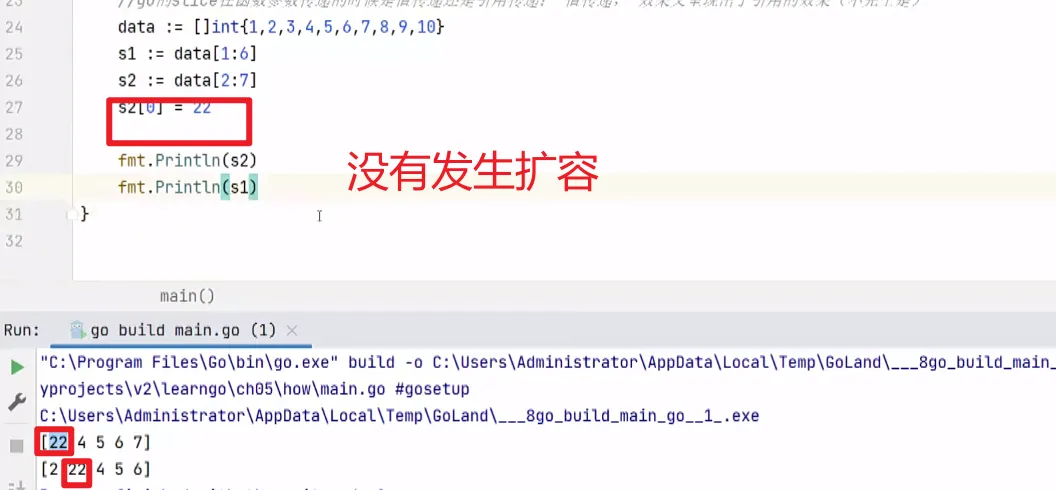
If append needs more capacity, it returns a descriptor for newly allocated storage. The local descriptor’s pointer, length, and capacity change; the caller’s descriptor is not automatically updated.
A function can therefore modify shared elements without changing the caller’s length or capacity. After reallocation, modifications to the new array no longer affect the old backing array. {: .prompt-tip }
Example:
3、map
A map is an unordered key-value collection designed for efficient lookup, normally expected O(1).
Keys are unique; values can repeat.
Keys must have a comparable type, such as booleans, numbers, strings, pointers, channels, or comparable arrays and structs. Slices, maps, and functions are not comparable key types. Values can have any type.
3.1. Basic map usage
Example:
var courseMap map[string]string{
    "courseName": "golang",
    "courseType": "backend",
}
// 其中基本格式是map[key_type] value_type
3.1.1. Initializing a map
Initialize a map before writing to it. A nil map can be read, but assignment to it panics.
Use a map literal or make to create writable storage.
// 第一种初始化方式
var courseMap map[string]string{
    "courseName": "golang",
    "courseType": "backend",
}

// 第二种初始化方式
var courseMap = make(map[string] string, 10)//make是一个内置函数
coueseMap["courseName"] = "golang"
A nil slice, by contrast, can be used with append.
3.1.2. Retrieve a value
Look up a value by its key.
An absent key returns the value type’s zero value.
var courseMap map[string]string{
    "courseName": "golang",
    "courseType": "backend",
}
fmt.Println(courseMap["courseName"])

// 第二种获取元素的方式
value, ok := courseMap["courseName"]
if ok{
    fmt.Println(value)
}else{
    fmt.Println("key不存在")
}

if value, ok := courseMap["courseName"]; ok{
    fmt.Println(value)
}else{
    fmt.Println("key不存在")
}
3.1.3. Delete an element
Use the built-in delete function.
Deleting an absent key is allowed.
delete(courseMap, "courseName")
//delete(map_name, key)
3.2. Iterating over a map
Use for-range.
Iteration order is unspecified and may change between runs.
//第一种遍历方式,两个参数
for _, value := range courseMap{
    fmt.Println(value)
}

// 第二种遍历方式,一个参数,key,然后通过key访问value
for key := range courseMap{
    fmt.Println(key, courseMap[key])
}
4、list
4.1. Introduction to lists
container/list provides a doubly linked list: an ordered collection stored in separate nodes, convenient for insertion and removal when the node is already known.
Each node stores additional pointers to its neighbors, increasing memory overhead.
Finding an arbitrary element requires traversal, typically O(n).
4.2. Basic list usage
var mylist list.List
mylist.PushBack("go")
mylist.PushBack("java")
mylist.PushBack("python")

// 遍历list(正向)
for i := mylist.Front(); i!= nil; i = i.Next(){
    fmt.Println(i.Value)
}

// 反向遍历
for i:= mtlist.Back(); i != nil; i = i.Prev(){
    fmt.Println(i.Value)
}

mylist.PushFront("c++")//头部插入元素
mylist.PushBack("c")//尾部插入元素
mylist.InsertAfter("c#", mylist.Front())//在指定元素后面插入元素
mylist.InsertBefore("c#", mylist.Back())//在指定元素前面插入元素

mylist.Remove(mylist.Front())//删除头部元素
mylist.Remove(mylist.Back())//删除尾部元素\
mylist.Remove(i))//删除指定元素