Basic string operations
1. Escape sequences
1.1. Basic rules
Escape sequences use a backslash, , rather than a forward slash.
Example:
name := "你可真是个\"小机灵鬼\""
//在这里直接使用"小机灵鬼"会报错,因为双引号是字符串的标志,所以需要使用转义符来表示引号:\"
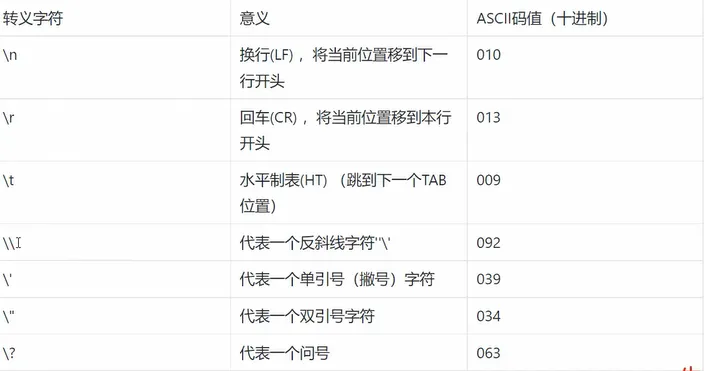
1.2. Common escape sequences
Common Go escape sequences are shown below.
2. Formatted output
Println adds a newline. Print does not add a newline automatically.
2.1. Basic usage
Building output by joining many pieces can be cumbersome:
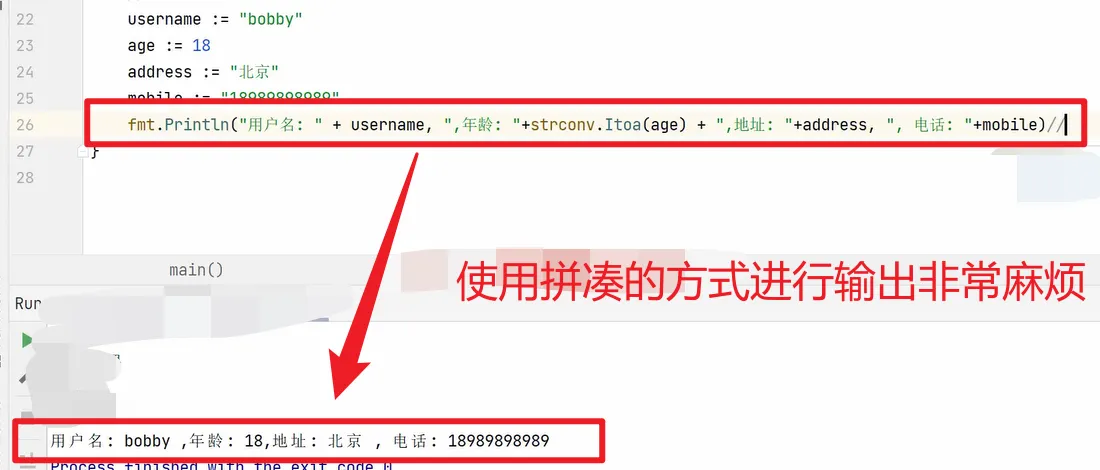
Use Printf for formatted output:
fmt.Printf("用户名:%s, 年龄:%d,地址:%s, 电话:%s\r\n",username, age, address, mobile )2.2. Advantages and drawbacks
Advantage: readable and maintainable.
Drawback: formatting adds runtime overhead.
2.3. More formatting options
2.3.1. Default format and type

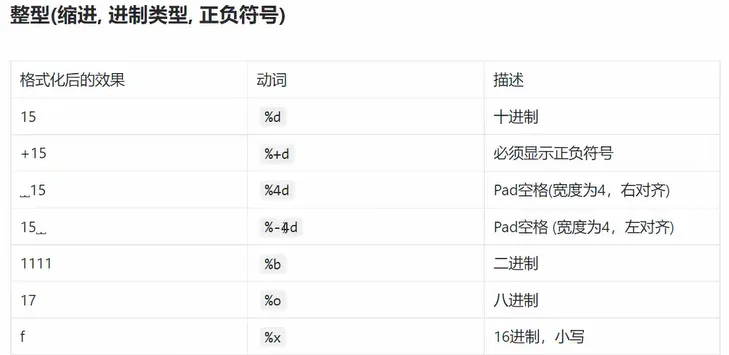
2.3.2. Integers
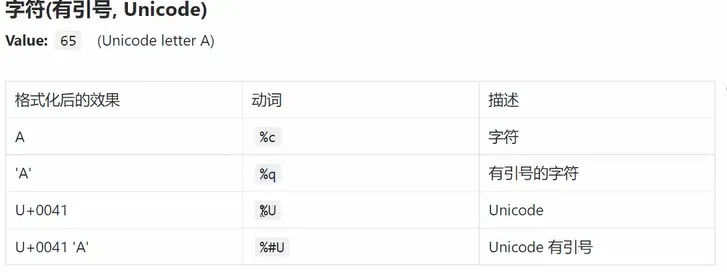
2.3.3. Characters
2.3.4. Strings
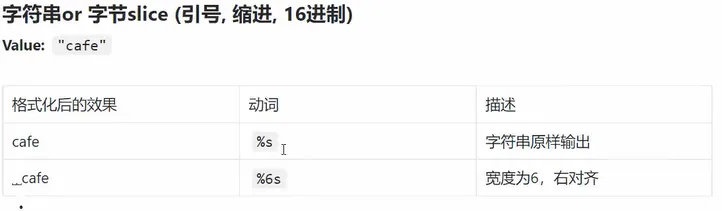
2.3.5. Floating-point values
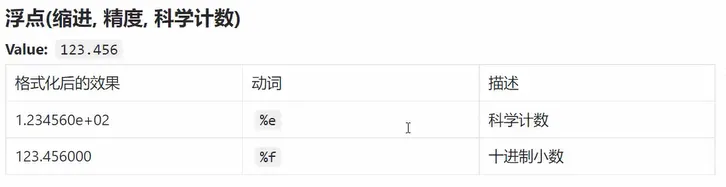
3. Common string operations
3.1. Measuring string length
What “length” means depends on the data and the operation.
3.1.1. ASCII letters and digits
name := "hello world"
fmt.Println(len(name))
3.1.2. Strings containing Chinese characters
name := "hello 世界"
bytes := []byte(name)
fmt.Println(len(bytes))
3.2. Efficient string concatenation
3.2.1. Using +
username := "user" + "name"3.2.2. Formatting at output time
fmt.Printf("用户名:%s, 年龄:%d,地址:%s, 电话:%s\r\n",username, age, address, mobile )
3.2.3. Using strings.Builder
This is useful for building a string from many pieces efficiently.
var builder strings.Builder
builder.WriteString("hello")
builder.WriteString("world")
result := builder.String()
fmt.Println(result)
3.3. Comparing strings
//等于
a := "hello"
b := "hello"
fmt.Println(a == b)

//不等于
a = "hello"
b = "world"
fmt.Println(a != b)

//大于
a = "hello"
b = "world"
fmt.Println(a > b)

//小于
a = "hello"
b = "world"
fmt.Println(a < b)

//大于等于
//小于等于
//……
3.4. Common functions in strings
3.4.1. Importing the package
import {
	"fmt"
	"strings"
}
3.4.2. Frequently used operations
(1) Check whether a string contains a substring
strings.Contains("hello world", "world")(2) String length
name := "hello world"
len(name)
(3) Count occurrences of a substring
strings.Count("hello world", "l")(4) Split a string
//以空格为分隔符进行分割
strings.Split("hello world", " ")
(5) Check a prefix or suffix
//前缀
strings.HasPrefix("hello world", "he")

//后缀
strings.HasSuffix("hello world", "ld")
(6) Find a substring’s position
//英文
strings.Index("hello world", "lo")
(7) Replace a substring
//把字符串里的所有l替换成a,替换前2个
//-1表示全部替换
strings.Replace("hello world", "l", "a", 2)
(8) Change letter case
//全转成小写
strings.ToLower("HELLO WORLD")

//全转成大写
strings.ToUpper("hello world")
(9) Trim specified characters
//去掉左右两边指定的字符,指定的字符可以是多个,比如空格,#,*等
strings.Trim("#hello #world#", "#")
//得到的结果是:hello #world

//左边的特殊字符
strings.TrimLeft("#hello #world#", "#")
//得到的结果是:hello #world#

//右边的特殊字符
strings.TrimRight("#hello #world#", "#")
//得到的结果是:#hello #world
For more functions, inspect the package source or documentation. Most IDEs let you jump from a function name to its definition.